
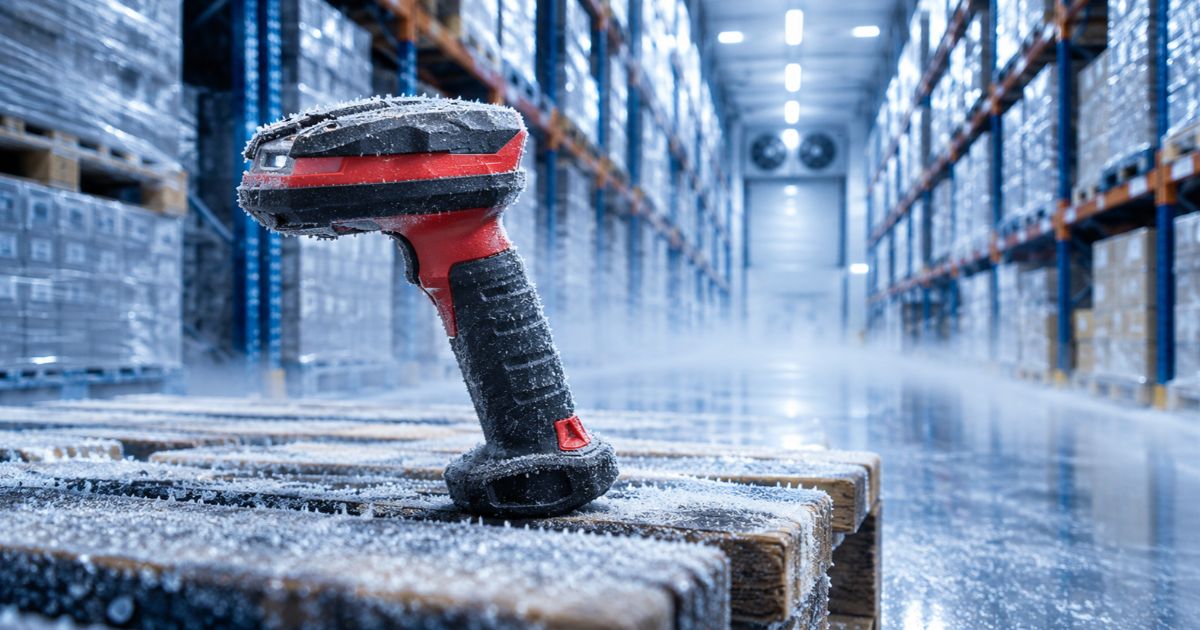
How Cold Chain Operators Keep Scanning Accurate at -25°C
What Actually Fails in a Freezer
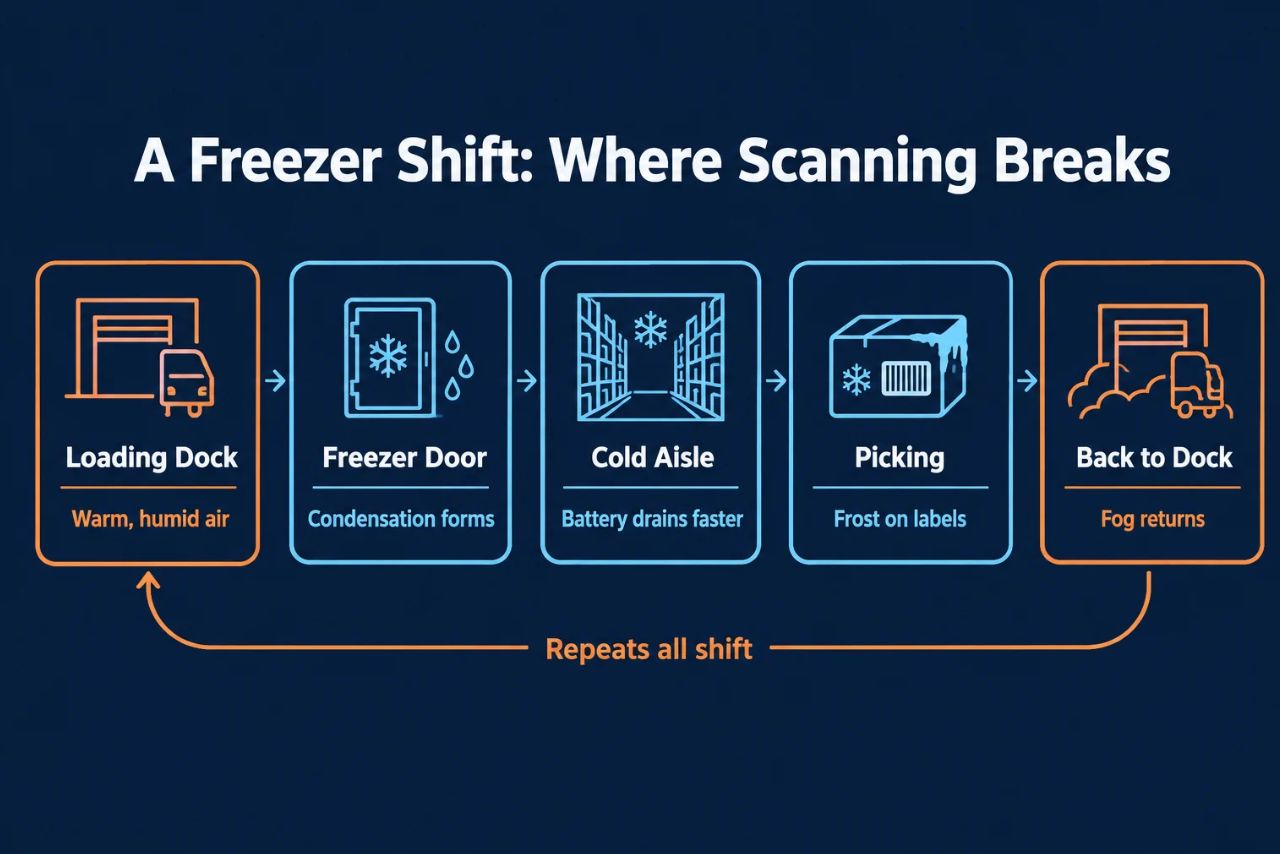
A scanner does not fail at −25 °C simply because it is cold. It fails because cold interacts with four things: the battery, the moisture in the air, the label and the person holding the device. Each one can be managed, but only if you know which one is breaking. Most scanning problems in cold chain operations show up at transitions, for example when a picker steps from a warm loading dock into a freezer aisle and back, many times a shift.
This article walks through those four failure points in the order a freezer shift meets them, then covers traceability rules that raise the stakes, a pilot method for testing devices, and the questions to ask suppliers. We found no independent studies of scan failure rates in cold storage. Most published evidence comes from device, battery and label suppliers, and the text flags where that is the case.
| USD 246–371 B | Global cold chain market in 2025 across four research firms: 360iResearch USD 246.0 billion, Fortune Business Insights USD 360.8 billion (logistics), Grand View Research USD 371.1 billion. MarketsandMarkets puts 2026 at USD 276.5 billion. Growth forecasts range from 10.5% to 20.5% a year because definitions differ. (Sources: as named, 2025–2026) |
| About 50% | Capacity a battery that delivers 100% at 27 °C typically delivers at −18 °C, and most batteries are at about 50% of performance at −20 °C. Chemistries differ. (Source: Battery University, BU-502, retrieved 2026) |
| −20 to −30 °C | Operating temperature of two cold-storage versions of one rugged handheld, "Chiller" and "Arctic", both with heated scan windows, according to the manufacturer's cold chain brief. (Source: Zebra Technologies cold chain solution brief, 2013) |
| 20 July 2028 | Date before which the FDA will not enforce its Food Traceability Rule, which requires lot-level records for foods on the Food Traceability List. Records must be producible within 24 hours of a request, or a reasonable time the FDA agrees to. (Source: FDA draft guidance, October 2026) |
| Failure point | What happens in the cold | What to ask or do |
|---|---|---|
| Battery | Capacity falls to about half at −18 to −20 °C, and voltage sag can shut a device down while charge remains | Ask for runtime at the temperature of use and the charging limits; charge batteries in a warm area |
| Condensation | Moving between a warm, humid dock and a freezer fogs the scan window and the display | Ask about heated windows, optical bonding and recovery time after each transition |
| Labels | Frost blocks the adhesive, and some adhesives will not stick below their minimum application temperature | Check the minimum application temperature, use thermal transfer ribbons, and test through freeze-thaw cycles |
| People | Gloves, short stays in the freezer and constant transitions slow every scan | Check that keys and the trigger work with gloves, and batch picks by temperature zone |
The Battery: Capacity Loss Is Only Part of the Problem
Battery University, a widely used reference on battery chemistry, states that a battery giving full capacity at 27 °C typically delivers only about half at −18 °C, and that most batteries sit near 50% performance at −20 °C (Source: Battery University BU-502, retrieved 2026). A lithium-ion battery rated at 3,000 mAh at room temperature therefore cannot be assumed to give a full shift in a freezer.
The loss in usable runtime can be worse than the capacity figure suggests. Cold raises the internal resistance of a cell. When the scanner draws a burst of current, the voltage can sag below the device's shutdown threshold even though charge remains. A handheld-terminal maker describes devices shutting down at −20 °C after a capacity loss of about 25%, for exactly this reason (Source: Unitech technical note, retrieved 2026). Heaters for scan windows and displays add to the load.
Charging is a separate issue. Battery makers advise against charging lithium-ion cells when they are frozen, because charging cold cells can damage them through lithium plating (Source: EBL battery guidance, retrieved 2026). A practical policy is to charge batteries in a warm area and to rotate them rather than to leave a device on a cradle in the freezer. Ask suppliers for runtime at the temperature of use, not at 25 °C, and for the charging temperature limits.
Plan battery supply from the cold figure, not the datasheet figure. As an illustration, if a device runs 10 hours at room temperature and delivers about half of that in a freezer, plan for about 5 hours of freezer runtime, then add margin for heaters and for batteries that age. The 10-hour figure and the 50% factor here are assumptions for the example, so replace them with measurements from your own pilot. Count how many battery swaps a shift needs, where batteries are charged, and who is responsible for keeping spares warm.
Condensation: The Transition Is the Hard Part
Why it forms
When a device moves from a warm, humid dock into a freezer, the air in and around it cools quickly and can no longer carry its moisture, so the moisture condenses (Source: Rugged PC Review, 2014). The reverse trip is just as harmful: a cold device meeting warm humid air collects condensation on its outer surfaces. Condensation on the inside of the scan window is the worse case. The operator cannot wipe it away, and it scatters the light and blurs the image the scanner needs (Source: US Patent 5,729,003, retrieved 2026).
What device designers do about it
Freezer-rated mobile computers combine several measures. Published descriptions list heated scan windows to keep the window above the dew point, optically bonded displays that remove the air gap where fog would form, display heaters that keep screens responsive in cold, and keyboards designed so that keys do not ice up (Source: Zebra cold chain solution brief, 2013; Rugged PC Review, 2014). A published US patent describes a scanner that senses window temperature, ambient temperature and humidity, calculates the dew point and sets a window heater accordingly, and it also describes a vent that equalizes pressure between the inside and outside of the device (Source: US Patent 11,281,266, retrieved 2026).
Those two sources are dated, and the price premiums reported at the time (US$700 for a chiller version and US$1,100 for an arctic version over the base model) will not apply to current products. They remain useful for the structure: one model for chilled areas near −20 °C, another for freezers near −30 °C and frequent transitions.
Match the device to the transitions
A device kept in a cold room all day sees less condensation than one that crosses between a freezer and a loading dock every ten minutes. Describe your pattern before choosing. Sealing also matters: a sealed enclosure must tolerate the pressure changes that come with repeated temperature swings, which is one reason cold chain devices are typically specified at IP65 and IP67 (see our guide to IP ratings for industrial scanners).
Labels: Frost, Adhesion and Print Quality
A scanner can only read what the label still shows. Label suppliers describe the same causes of cold-storage failure: frost or moisture that forms a barrier between adhesive and surface, adhesives with a minimum application temperature above the surface temperature, and print that smears or fades (Source: Thermal Printer Supplies; Barcode Factory; ID Label, retrieved 2026).
- Adhesive. Check the minimum application temperature, not only the service temperature. A label rated to survive −25 °C may still fail to stick if it is applied to a product that is already frozen.
- Surface. Labels applied to frost or moisture lose adhesion. Suppliers advise wiping the surface dry and pressing firmly.
- Printing method. Suppliers generally favor thermal transfer over direct thermal for durability, with a wax ribbon for paper labels and wax-resin or full-resin ribbon for synthetic labels.
- Material. Synthetic face stocks stay flexible in the cold, while some paper stocks become brittle, according to label makers.
Where the process allows, apply labels before the product enters the freezer, or in a cool room above the adhesive's minimum application temperature, rather than onto frozen goods. Suppliers advise that labels which must be applied in the cold need a very low minimum application temperature and firm, even pressure across the whole label (Source: Thermal Printer Supplies, retrieved 2026).
Print quality is graded under ISO/IEC 15416 for linear symbols and ISO/IEC 15415 for 2D symbols (Source: GS1 support, 2024). Grade labels after the freeze-thaw cycles they will actually see, not only when they come off the printer.
People: Gloves, Walking Time and Hands-Free Work
The device has to work for someone wearing insulated gloves, and that person is limited in how long they can stay in the freezer. Published product briefs for freezer-rated computers mention keyboards that resist icing and heated displays that avoid sluggish screen refresh (Source: Zebra cold chain solution brief, 2013; Data Capture Solutions listing, retrieved 2026). The same brief lists a wearable scanner with a freezer pouch designed to prevent condensation while allowing data entry.
We found no independent data on how much scanning time freezer work costs. The sensible approach is to measure it: time a picker on a standard route in the freezer and compare it with the same route at ambient temperature. Reducing the number of transitions, for example by batching picks by temperature zone, helps every failure point in this article.
Traceability Rules Raise the Stakes for Every Scan
In the United States, the FDA Food Traceability Rule, known as FSMA 204, requires companies that make, process, pack or hold foods on the Food Traceability List to keep records of key data elements at critical tracking events, linked to a traceability lot code, and to give those records to the FDA within 24 hours of a request, or within a reasonable time the FDA agrees to. The original compliance date was 20 January 2026. The FDA proposed in August 2025 to extend it to 20 July 2028, and a 2026 appropriations act directed the FDA not to enforce the rule before that date (Source: FDA draft guidance, October 2026).
The rule defines what records you must keep, not which technology captures them. Barcodes that carry GS1 identifiers, such as pallet and case labels, are a common way to capture lot data at each event (Source: Produce Traceability Initiative; Inecta, 2026). In a freezer, that means a failed scan is not only a lost second. It can be a missing record at a critical tracking event. Companies that handle frozen foods on the list should confirm with their compliance team which of their scans are critical tracking events, and test those scans first. This is general information, not legal advice.
What a Failed Scan Costs in the Cold
A missed scan is a small event that happens many times. As an illustration, suppose a picker makes 400 scans an hour over an 8-hour shift, which is 3,200 scans. At a 99% first-read rate, 32 scans fail. At 95%, 160 fail. If each failure costs 10 seconds to clear, by wiping the window, re-aiming or typing the code with gloved hands, that is about 5 minutes of lost time at 99% and about 27 minutes at 95%. The scan rate, the 10 seconds and both read rates are assumptions for the example, not measured values.
The arithmetic shows why first-read rate matters more than any single temperature rating, and why the pilot below measures it directly. It also shows that the cost of a failure grows when the person is wearing gloves and standing in a freezer, so each avoided re-scan is worth more than its ambient-temperature equivalent.
How to Pilot a Device Before You Commit
Marketing temperature ranges do not tell you whether a device will survive your shift. A simple pilot, run by the people who will use the device, answers more questions than a datasheet:
- Run a full shift at the real temperature, with the real number of freezer-to-dock transitions, and record battery state at the start, middle and end.
- Time the recovery after each transition: how long until the scan window and display are clear and the first scan succeeds.
- Scan your actual labels, including frosted ones and those that have been through freeze-thaw cycles, and record the first-read rate.
- Test with gloves on the keys or touchscreen and for scan-trigger access.
- Charge and rotate batteries the way you would in production, and log any shutdowns.
- Repeat over several days, including the most humid day you can find, because condensation depends on dock humidity.
Compare each result with the same device at ambient temperature so that you can tell cold-related failures from ordinary ones.
Questions to Ask a Cold Chain Device Supplier
- What are the operating and charging temperature limits, and what runtime is measured at the temperature of use?
- Does the scan window have a heater, and is it automatic? Does the display have a heater or optical bonding?
- How does the device handle repeated freezer-to-dock transitions, and how long does it take to recover?
- How is the enclosure sealed and vented, and what sealing rating applies after repeated temperature cycling?
- Can keys and the trigger be operated with insulated gloves, and do keys resist icing?
- Which labels, adhesives and ribbons does the supplier recommend, and have they been tested through freeze-thaw cycles?
- How are batteries specified for cold, and what is the policy for charging them?
- What is the warranty for cold-environment use, and does it exclude condensation damage?
Treat the Transition as the Test
Cold chain scanning is difficult because of the combination of conditions: a battery that delivers about half its capacity, air that deposits moisture each time a device changes zones, labels that must stick to frost and a person working in gloves against the clock. Ask about each of those four, not just about a temperature range.
The most reliable way to choose is to pilot candidate devices through the real transitions with the real labels, and to measure first-read rate, runtime and recovery time. With traceability rules raising the cost of a missed scan, that measurement is worth the effort.
Frequently Asked Questions
How much does cold reduce a scanner's battery capacity?
A battery that gives full capacity at 27 °C typically delivers about half at −18 °C, and most batteries sit near 50% performance at −20 °C (Source: Battery University, BU-502). Usable runtime can be worse, because cold raises internal resistance and the voltage can sag below the shutdown threshold under load. Plan battery supply from runtime measured at the temperature of use.
Why does a scan window fog up when moving from a freezer to a loading dock?
Warm, humid air that meets a cold surface cannot hold its moisture, so the moisture condenses on the device. Freezer-rated devices use heated scan windows, optically bonded displays and pressure-equalizing vents to manage this, and the pattern of transitions matters as much as the temperature rating.
Do cold chain scanners need an IP67 rating?
There is no single rule. The freezer-rated mobile computers in one manufacturer's cold chain brief carry both IP65 and IP67 ratings, but sealing alone does not stop condensation inside a device. Match the rating to your water exposure, and ask how the enclosure handles repeated temperature cycling.
When do the FDA traceability rules apply, and what must scans capture?
The FDA will not enforce the Food Traceability Rule before 20 July 2028. It requires covered companies to keep key data elements at critical tracking events, linked to a traceability lot code, and to give records to the FDA within 24 hours, or within a reasonable time the FDA agrees to. The rule sets what records you keep, not which technology captures them, so confirm which of your scans are critical tracking events.
Scanning in a demanding environment?
Share your operating conditions, and we'll give you an honest view of what fits.
Explore ALVICS Products → Logistics & Transportation Solutions →