
Do Field Technicians Need Rugged Scanners to Manage Service Parts? What the Evidence Shows
Why the Parts Record Matters More Than the Scanner
A field technician can diagnose a fault correctly and still leave without fixing it, because the part is not in the van. Aberdeen Group research from 2012 found that not having the right part was the top reason a customer issue could not be resolved on the first visit, and that when a part was needed, the correct one was in truck stock only 42% of the time (Source: Aberdeen Group, Convergence 2012, November 2012). The scanner's job in that picture is narrow. It keeps the record of what is in each van true as parts are loaded, used and returned.
Many articles on service parts assume that technicians use rugged scanners for that job. The evidence is more mixed. Surveys show that consumer-grade devices are still the most common choice in field service, and we found no independent study that compares rugged scanners with phones for parts handling. So this article separates three questions: where parts records break down, what a scan has to capture, and when rugged hardware earns its price. It closes with a pilot method and questions for suppliers.
Most published evidence comes from software vendors, device makers and the research firms they sponsor, and the text flags this where it applies. Several of the best-known numbers are more than ten years old, and each one is labeled with its year.
| 42% | Share of jobs needing a part in which the correct part was in truck stock, in Aberdeen Group research from early 2012. The same research found that 52% of field service visits required a service part. Survey data now more than ten years old. (Source: Aberdeen Group, Convergence 2012, November 2012) |
| 61% vs 53% | First-time fix rate of service organizations that gave management real-time insight into parts usage and field stock, compared with those that did not (n = 121). This is a correlation; Aberdeen did not test cause and effect. (Source: Aberdeen Group, Convergence 2012, November 2012) |
| 50% / 41% | Share of 100 US field service companies that give technicians handheld mobile computers (50%) and smartphones (41%). Overall, 77% buy consumer-grade devices only or a mix, and 23% buy enterprise-grade only. The survey was sponsored by a device maker. (Source: BlueStar survey sponsored by Zebra Technologies, August 2024) |
| $3K vs $25K | Value of parts carried by different technicians at one US medical-equipment service organization, discovered only after it centralized its service data. The same article puts a truck visit at $200 to $400. The article is from a Salesforce-sponsored e-book. (Source: Field Service News, October 2022) |
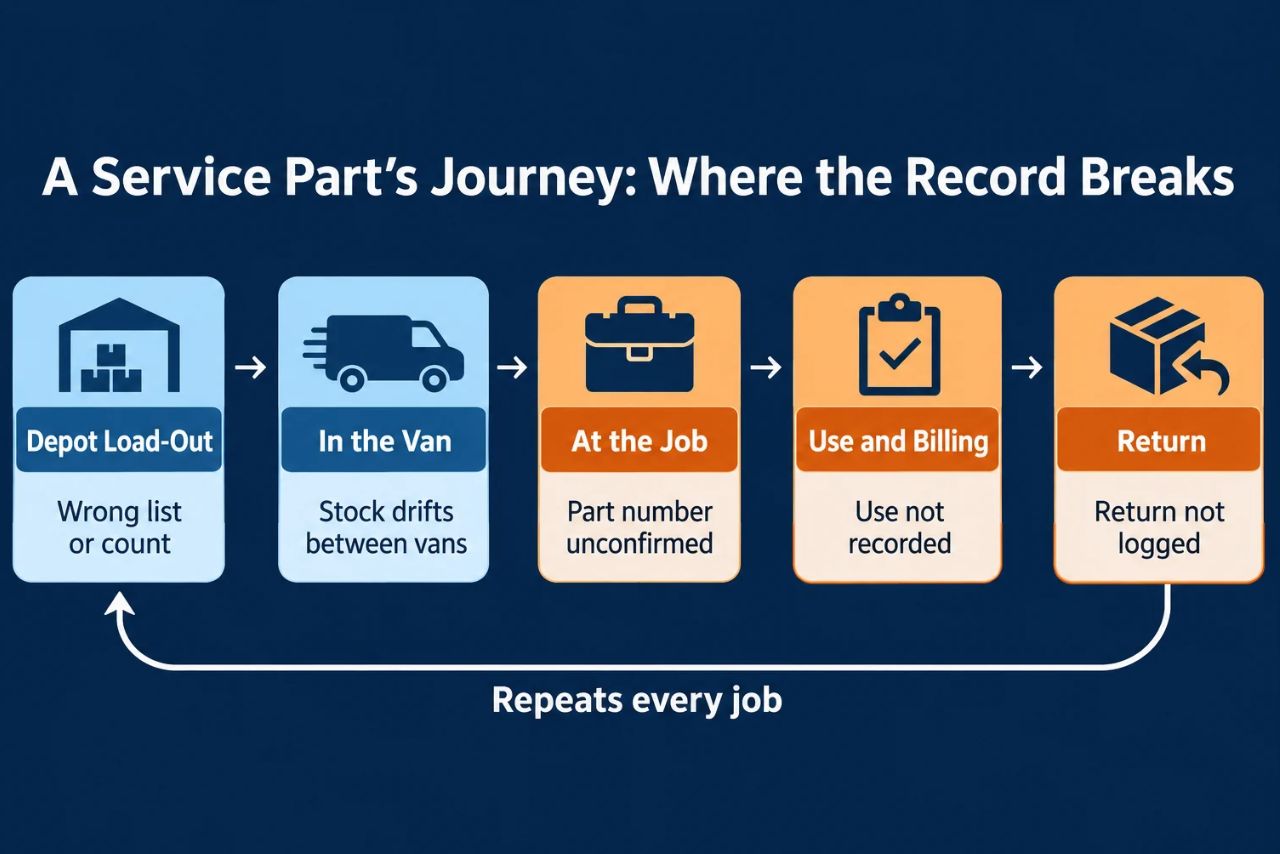
| Step | What can go wrong | What a scan or check adds |
|---|---|---|
| Depot load-out | The van is loaded from memory or a paper list, and quantities differ from the record | Scan each part into the van location so the system shows what the van actually holds |
| In the van | Parts move between vans or are hoarded, and stock differs widely by technician | Scan transfers out and in, and run periodic scan counts |
| At the job | The technician cannot confirm the part number or revision before fitting | Scan the label on the failed part and on the replacement, and match both to the work order |
| Use and billing | A part is used but not recorded, so it is neither billed nor restocked | Scan at the point of use and link part and serial number to the work order |
| Returns | Failed or unused parts come back late or unrecorded | Scan on return so the part's location is known until it reaches the depot |
Where Parts Records Break Down
A service part passes through five moments between the depot shelf and the return bin: loading, storage in the van, fitting, recording and return. The figure above shows them. A record can drift from reality at any of them, and the research below suggests that visibility into van stock, rather than scanning for its own sake, is what correlates with better outcomes.
Load-out and van stock
Parts reach a van in one of two ways: loaded at a depot or handed over by another technician. Both are moments when a record can drift. A Field Service News feature from a Salesforce-sponsored e-book describes the result at one US medical-equipment service organization. Only after it centralized its service data did managers see that some technicians carried $3,000 of parts in their trucks while others carried $25,000 (Source: Field Service News, October 2022). The article does not say that missing scans caused this, but it shows what happens when no van-level record exists: stock cannot be balanced.
Aberdeen found that organizations giving management real-time insight into parts usage and field stock reported a 61% first-time fix rate, against 53% for those without it (Source: Aberdeen Group, November 2012). That is a correlation from a survey of 121 service organizations, and the data date from 2012.
Software vendors market scan-to-van workflows for this step. One vendor case study describes a rollout for 7,500 mobile workers at a US service company, Safelite, since 2017 (Source: Descartes Localz case study, retrieved 2026). Its results are vendor-reported and the page gives no independent measurement.
At the job
Because 52% of field service visits needed a service part in Aberdeen's early-2012 research, just over half of all visits depend on picking, fitting and recording the right item. Confirming the part number and revision before fitting is where a scan can prevent a wrong fit. Vendors argue that scanning removes retyping errors, but we found no independent measurement of error rates in field parts entry, so treat that claim as untested.
Use and returns
A part used but not recorded is invisible to billing and to replenishment. A part returned late is invisible to the depot. In Aberdeen's study, 40% of the top-performing organizations made technicians responsible and rewarded them for accurate, timely return and reconciliation of parts, compared with 29% of the rest (Source: Aberdeen Group, November 2012).
In our reading, this points to process and incentives as much as to hardware. A scanner that is fast and convenient makes the right behavior easier, but a technician who is not expected to scan will not scan, whatever the device's drop rating. This is an editorial judgment, not a measured result.
What the Scan Must Capture
A part label in service work may need to carry more than a part number. Serial number, lot and revision are also part of the record, and vendors list warranty activation, claims processing and recalls among the reasons to capture them at the point of use (Source: Scandit guide, retrieved 2026). Standards exist for carrying them in one symbol. For items supplied to the US Department of Defense, the Defense Federal Acquisition Regulation Supplement requires a two-dimensional Data Matrix symbol (ISO/IEC 16022, ECC200) whose data fields are qualified with application identifiers, data identifiers or text element identifiers using the ISO/IEC 15434 message syntax (Source: acquisition.gov, DFARS item identification clause, retrieved 2026).
Commercial manufacturers write similar rules into their supplier requirements. One industrial manufacturer's marking specification requires Data Matrix codes whose content follows ANSI MH10.8.2 field identifiers, with the material number as the minimum content (Source: Voith marking specification VS 3268, retrieved 2026). GS1 application identifiers, listed in ISO/IEC 15418 alongside the ANSI data identifiers, are another way to label each field.
Three practical points follow for a technician's scanner. First, it must read 2D symbols as well as 1D barcodes. Second, the field service application must parse the data fields, not just receive a string of characters. Third, labels on parts in service are often worn, oily or small, so print quality matters. Quality is graded under ISO/IEC 15416 for linear symbols and ISO/IEC 15415 for 2D symbols, with ISO/IEC TR 29158 for direct part marks (Source: GS1 Austria and GS1 UK, retrieved 2026). Not every manufacturer follows these standards, and many service parts carry only a 1D part number or a vendor-specific code, so the pilot below must use your actual labels.
Software vendors also market camera-based scanning on smartphones for van stock, including reading several barcodes in one frame (Source: Scandit blog, retrieved 2026). We found no independent test that compares camera scanning with dedicated scan engines on worn parts labels, so test both on your own parts.
Do Technicians Actually Use Rugged Scanners?
A 2024 survey of 100 US field service managers and executives, run by a distributor and sponsored by Zebra Technologies, gives a recent snapshot. Fifty-eight percent of companies gave technicians laptops, 50% handheld mobile computers and 41% smartphones. When asked what they buy, 77% said consumer-grade devices only or a mix, and 23% said rugged or enterprise devices only (Source: BlueStar survey sponsored by Zebra Technologies, August 2024).
Respondents who bought consumer-grade devices most often cited familiarity and devices bundled with a wireless plan. Those who bought enterprise-grade devices cited battery life (48%), software support (46%) and security (43%). Battery life was also the most common complaint on both sides, at 54% for consumer devices and 52% for enterprise devices. Durability was cited as a challenge by 52% of enterprise-device users and 36% of consumer-device users, which the survey authors called surprising. Scanning was one of several uses each named by at least 30% of respondents, so it is a common task but not the dominant one.
A 2020 Zebra "Future of Field Operations" study of more than 400 decision makers took a different tone. It projected that 93% of service providers would use both rugged tablets and rugged smartphones by 2025 (Source: Zebra Technologies press release, April 2020). That is a vendor survey and a forecast, and we could not find a later measurement of whether it came true. The two surveys differ in sample, wording and date, so they cannot be compared directly.
Taken together, they support a modest conclusion. Many technicians carry mobile computers or phones, a majority of companies still use consumer-grade devices at least in part, and neither survey shows that rugged hardware improves parts accuracy. For the wider trade-off between phones and dedicated devices, see our article on mobile computers vs dedicated scanners.
What Rugged Does and Does Not Promise
Rugged claims on spec sheets usually cite MIL-STD-810 test methods and an IP rating. The transit drop test (Method 516.8, Procedure IV) is the most often quoted. One published data collector sheet, for example, lists IP67 and 26 drops from 1.22 m (4 ft) onto plywood at room temperature, plus six-face drops at −20 °C and +55 °C (Source: Trimble TDC6 spec sheet, via Frontier Precision, 2025). A 2013 article noted that many manufacturers, particularly of larger notebooks, cite drop tests from shorter heights (Source: Route Fifty, 2013).
Test conditions matter. Rugged PC Review reports that MIL-STD-810H changed the default impact surface for drop tests to steel plate over concrete, where earlier editions used plywood over concrete, and added drop scenarios beyond the transit drop (Source: Rugged PC Review, retrieved 2026). Ask for height, surface, temperature, number of units and who ran the test. For an explanation of dust and water ratings, see our guide to IP ratings for industrial scanners.
The cost evidence is dated and sponsored. A white paper from a device maker cites a 2007 VDC Research study that put annual total cost of ownership at under $2,900 for enterprise-class handhelds against more than $4,000 for consumer-grade ones (Source: VDC Research via a Motorola white paper, 2007). A 2015 poll of more than 200 IT executives commissioned by Kyocera reported total cost of ownership 46% lower for rugged devices and a failure rate for non-rugged devices three times higher (Source: Manufacturing.net, October 2015). Both were commissioned by device makers, and both predate today's cased smartphones. We found no recent independent total-cost study.
The practical reading is to match the device to exposure, not to job title. A technician who services equipment in heated buildings and works from a vehicle faces different risks from one who works outdoors, climbs, or handles wet and dusty equipment. Our comparison of industrial and commercial scanners covers the same question for fixed sites.
What a Missed Part Costs: An Illustration
The size of the prize depends on how often the right part is in the van. As an illustration, suppose a service team runs 1,000 jobs a month that need a part. If the right part is in the van 60% of the time, 400 jobs have a miss. At 80%, 200 jobs do. At 95%, 50 do. If each miss costs one extra trip at $300, the midpoint of the $200 to $400 per truck visit quoted in one article (Source: Field Service News, October 2022), the monthly cost of misses is $120,000, $60,000 and $15,000.
The job count, the three availability rates and the $300 are assumptions for the example, not measured values, and a miss does not always become a second visit. Scanning does not create parts availability on its own. It keeps the van record accurate, so that dispatch, replenishment and forecasting work from the truth. Aberdeen's 42% from 2012 is a reminder that the starting point for many organizations was well below the first illustrative rate.
How to Pilot a Device and Workflow Before You Commit
A datasheet cannot tell you whether a device will keep your van records accurate. A short pilot run by the technicians who will use it answers more questions:
- Choose different routes. Include a technician who works indoors from a vehicle and one who works outdoors or in wet, dusty or cold sites, and give each the candidate devices.
- Count the van by hand at the start, then compare with the system record after two weeks, and record the mismatches by part.
- Scan your actual labels, including worn, oily, small and 2D ones, and record first-read rate and seconds per scan.
- Test real conditions: gloves, rain or glare, one-handed use while holding a part, and dead zones. Check whether the application queues scans and syncs later.
- Log hardware events: drops, cracked screens, battery runtime across a full shift, and help-desk calls per device.
- Track repeat visits caused by parts for 30 days before and during the pilot, using the same definition of a repeat visit in both periods.
Where possible, run a phone in a protective case and a rugged handheld on the same routes, so that differences in loss and downtime come from your own conditions.
Questions to Ask a Device Supplier
- Which 1D and 2D symbologies can the device read, and how does it perform on worn or low-contrast labels?
- Can the field service application parse ISO/IEC 15434 data identifiers or GS1 application identifiers, or does it need a custom parser?
- What are the test conditions behind the rugged claims: drop height, surface, temperature, number of units, and who ran the tests?
- What IP rating applies, and is it maintained after drops and years of use?
- What is the battery runtime over a full shift with scanning and mobile data, and are spare or swappable batteries available?
- Does the application work offline, and how does it resolve conflicts when the same part is scanned on two devices?
- Which field service and ERP systems are integrated, and who supports the integration?
- What are the warranty terms, repair turnaround and software update period, and does the warranty cover drops?
Fix the Parts Record First, Then Choose the Device
Missing parts are widely reported as a leading cause of repeat visits, and an accurate record of what each van holds is a precondition for fixing that. The device matters less than whether technicians scan at every step, whether the scan captures the data the business needs, and whether the application works where they work.
Rugged hardware is easiest to justify when technicians face drops, water, dust or cold. Where they do not, a cased phone may be enough, and the evidence does not yet settle the question either way. The most reliable way to decide is to pilot both on real routes, with real labels, and measure van-record accuracy, first-read rate and hardware events.
Frequently Asked Questions
Do field technicians need rugged scanners to manage service parts?
Not always. Surveys show consumer-grade devices remain common in field service, and we found no independent study comparing them with rugged scanners for parts handling. Rugged hardware is easier to justify where technicians face drops, water, dust or cold. Match the device to the exposure, and pilot it with your own labels.
What causes repeat visits in field service?
Missing parts are widely reported as a leading cause. Aberdeen Group research from 2012 ranked not having the right part first and found the correct part was in truck stock 42% of the time when one was needed. Other summaries give shares from 29% to 51%, so measure the reasons in your own repeat visits.
What should a technician's scanner read on service parts?
It should read the labels your parts actually carry. Many carry a 1D part number, while some manufacturers use 2D Data Matrix codes holding part, serial and lot data in ISO/IEC 15434 format. Test the scanner on worn, small or oily labels, and confirm the software can parse each data field.
Are rugged devices cheaper over time?
Vendor-commissioned VDC Research studies from 2007 and 2015 reported lower total cost for rugged devices, but device makers sponsored both and both predate today's cased smartphones. We found no recent independent study. Compare repair, downtime and replacement costs from a pilot on your own routes.
Scanning in a demanding environment?
Share your operating conditions, and we'll give you an honest view of what fits.
Explore ALVICS Products →