
Handheld vs Fixed-Mount vs Wearable: Which Form Factor Fits Your Operation?
Start With How the Work Moves, Not With the Device
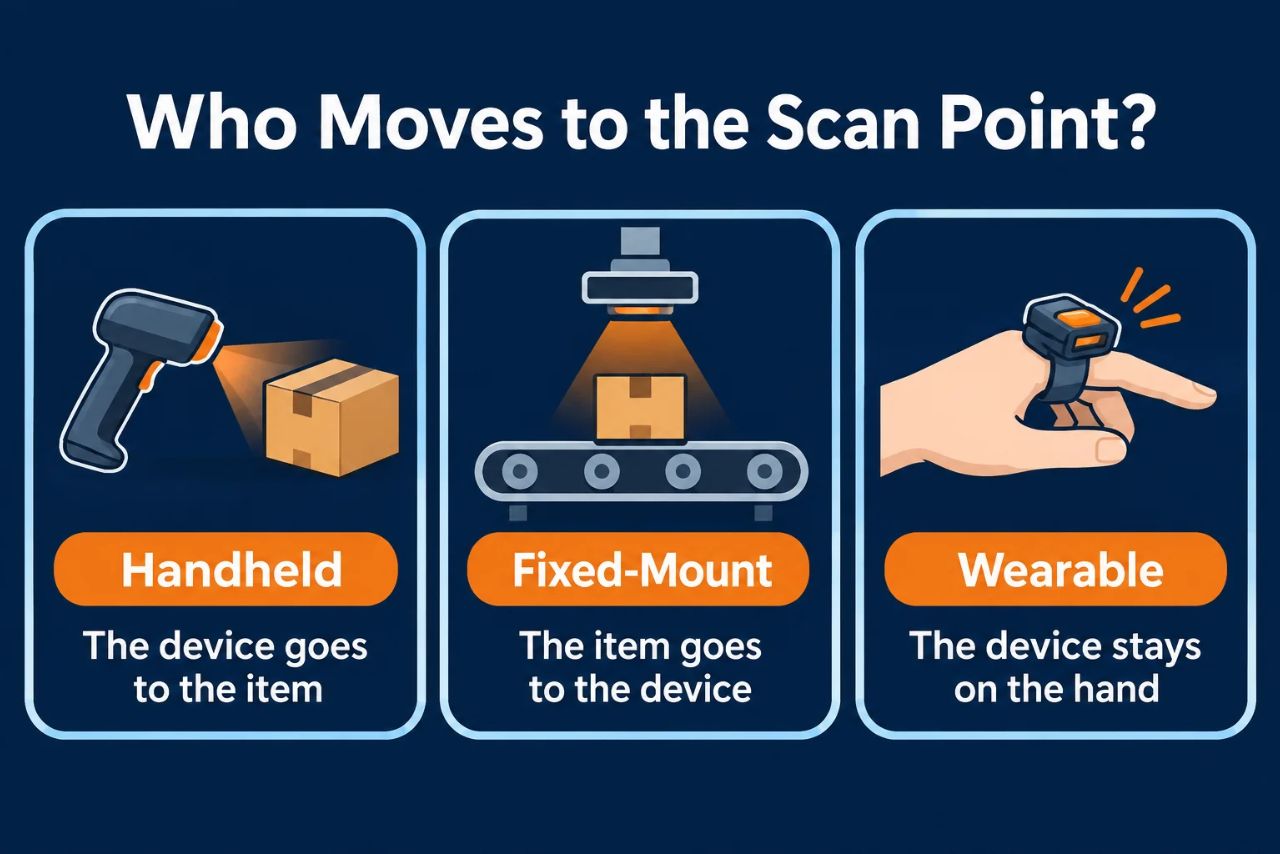
Handheld, fixed-mount and wearable scanners can all read the same barcode. What differs is who or what has to move to the scan point. A handheld goes wherever the worker goes, but someone has to pick it up, aim it and put it down. A fixed-mount reader stays in one place, so the item has to come to it. A wearable stays on the worker, so the hands can keep holding the item. One reader manufacturer describes the choice as a workflow decision rather than a matter of preference: handhelds suit places where scan points shift, and fixed readers suit places where items move through the same read zone every time (Source: Keyence, 2026).
This guide compares the three form factors, shows a decision table by task, and ends with a pilot method and eight questions for suppliers. It is a framework for choosing a form factor, not a device recommendation. We found no independent study that compares all three form factors in the same operation. The best independent evidence is two ergonomics studies, one on ring scanners and one on checkout scanners. Most productivity percentages come from suppliers or from single-site reports, and the text says so each time.
| 40–62% | Share of barcode scanner sales held by handheld models in 2025, depending on the research firm: Meticulous Research 40% (a five-way split that separates fixed-mount, hands-free and wearable scanners), GlobalInfoResearch about 60% and IMARC Group 62% (two-way splits of handheld and fixed or stationary). The gap reflects, at least in part, how each firm defines its segments. (Sources: as named, 2025) |
| 40 people | Size of the university lab study that compared a wand scanner, a ring scanner and smart glasses on shipment putting tasks. The ring scanner was the most productive device, the ring and wand scanners were rated the most comfortable, and smart glasses were the least comfortable and least productive. (Source: Gaddis et al., International Journal of Industrial Ergonomics, 2022) |
| 10 cashiers | Number of cashiers in a lab study of bi-optic (two-window) and single-window checkout scanners. All preferred the bi-optic scanner, and standing with it produced lower neck and shoulder muscle activity. Two of the three authors worked for NCR, a checkout technology maker. (Source: Lehman et al., Ergonomics, 2001) |
| 20–25% | Productivity gain that one third-party logistics provider reported for wearables (forearm-worn computers with ring scanners) over handhelds at a single Nashville distribution center: 25% in piece picking and 20% in case picking. A 2010 time study, reported second-hand. (Source: Logistics Viewpoints, 2010) |
| Form factor | Where the scan point is | Hands during the scan | Typically suits | Main trade-off |
|---|---|---|---|---|
| Handheld (scanner or mobile computer) | Varies in place and angle | One hand holds the device; it is picked up and put down | Receiving docks, mixed picking, audits, exceptions | Handling time on every scan; one hand occupied |
| Fixed-mount (including presentation and counter-mounted) | Fixed in one place | Both hands stay on the item | Conveyors, pack-out, checkout, production lines | Items must pass through the read zone; installation and setup effort |
| Wearable (ring, glove, wrist) | Moves with the worker across many scan points | The scanning hand keeps handling the item | Piece and case picking, sorting, returns | Shorter range and smaller battery are common; fit and acceptance vary |
Handheld Scanners: The Flexible Default
Handheld is the largest segment in every market estimate we found, and the reason is flexibility. It works where items differ in size, orientation or location, such as receiving docks, mixed picking and retail departments (Source: Keyence, 2026). A dock worker making a final check of incoming or outgoing goods is a typical fit (Source: Cognex, retrieved 2026). The shares in the data block differ because the firms count segments differently, so treat 40% to 62% as a range, not a precise figure.
The cost of that flexibility is handling. Each scan means reaching for the device, aiming and triggering it, then putting it down or holding it while the other hand works. The device also occupies one hand. The arithmetic in the fixed-mount section puts a number on that handling time.
Many handhelds are mobile computers, which add a screen, keypad and software to the scanner. They earn their place when the worker must see instructions, enter quantities or resolve exceptions, as covered in our article on mobile computers versus dedicated scanners. Where labels sit at different distances, compare depth of field and not only maximum range. A reader rated for 12 inches but only within a narrow band needs frequent adjustment (Source: Keyence, retrieved 2026). For connection choices, see our guide to wired and wireless scanners.
Fixed-Mount Scanners: When the Item Comes to the Reader
What fixed-mount means
A fixed-mount reader is installed permanently and reads items automatically as they pass through its field of view, with no worker involved. Manufacturers describe conveyor sortation, package induction and production-line verification as strong fits (Source: Keyence, 2026). One vendor guide says that when cartons of different sizes travel quickly down a conveyor, a small fixed reader is the better choice (Source: Cognex, retrieved 2026). The common thread is predictability: fixed readers work best where items move consistently through a defined read zone. Line-side applications are covered in our guide to scanners for manufacturing.
Presentation and counter-mounted scanners
Two related designs sit at stations rather than over conveyors. Presentation scanners detect an item shown to them and read it without a trigger press (Source: Keyence, 2026). Counter-mounted scanners, including bi-optic models with two windows, are used at checkouts. In both cases the worker moves the item and both hands stay on it. A reader maker argues that at a repeating picking or packing station this removes the time lost picking up and setting down a handheld (Source: Keyence, retrieved 2026). For checkout use, see our guide to scanners for retail.
The ergonomics evidence for counter-mounted designs is old and small. In a 2001 lab study of ten cashiers from a Dutch retailer, all preferred a bi-optic scanner to a single-window scanner, and standing with the bi-optic scanner produced lower neck and shoulder muscle activity (Source: Lehman et al., Ergonomics, 2001). Two of the three authors worked for NCR, which makes checkout scanners, and the study is about 25 years old, so treat it as a pointer rather than proof. An earlier NIOSH evaluation shows that fixed scanning is not effortless: wrist flexion and extension while scanning items was among the stressful postures it listed at supermarket checkstands (Source: Baron and Habes, Scandinavian Journal of Work, Environment & Health, 1992).
What a fixed installation demands
Fixed readers move the work from the operator to the installation. Depth of field must suit the range of item heights (Source: Keyence, retrieved 2026), and the reader must send its data to the line controller or host system. Image-based readers commonly support industrial protocols such as EtherNet/IP and PROFINET, and Power over Ethernet can remove a separate power run for ceiling-mounted units (Source: Keyence, 2026). Test with the real conveyor speed, label condition and lighting before rollout (Source: Keyence, 2026).
Sizing the handling time
As an illustration, suppose a pack station scans 1,200 items per shift and the worker spends 2 seconds picking up and putting down a handheld scanner for each one. That is 1,200 × 2 = 2,400 seconds, or 40 minutes, which is about 8% of an 8-hour shift. The 1,200 scans, the 2 seconds and the 8-hour shift are assumptions for the example, not measured values. Time your own station with a stopwatch before deciding whether a hands-free design is worth installing.
Wearable Scanners: Hands Stay on the Item
Wearable scanners attach to the finger, the back of the hand, a glove or the wrist, so the device is always in place. The picker grabs an item with one hand and scans with the same hand, without setting anything down. Our article on the rise of wearable scanners looks at the market question. Here the question is narrower: when does a wearable fit better than a handheld?
The best independent evidence is a university lab study of 40 healthy participants doing shipment putting tasks with a wand scanner, a ring scanner and smart glasses. The ring scanner was the most productive device. Participants rated the ring and the wand scanner the most comfortable, and discomfort in the eyes, neck and shoulders grew with smart-glasses use over the task (Source: Gaddis et al., International Journal of Industrial Ergonomics, 2022). The limits are real: a lab, healthy participants and one task type. The study supports the ring scanner as a fair candidate for picking-style work, not as a guaranteed result in your operation.
Field figures are mostly supplier-linked. A logistics provider's 2010 time study at one Nashville distribution center found wearables 25% more productive than handhelds in piece picking and 20% in case picking, according to an analyst's account of a webcast (Source: Logistics Viewpoints, 2010). An executive at a data-capture solutions provider says wearables offer up to a 20% productivity increase over handhelds in general (Source: Material Handling & Logistics, retrieved 2026). Both are single-site or supplier-side claims, the speakers chose the test conditions, and the 2010 study predates current devices, so run your own comparison.
The trade-offs are documented by supplier and integrator sources. A warehouse-systems integrator lists shorter battery life, wear on the trigger and fastening strap, and limited range among the drawbacks of ring scanners, although some models read from several feet away. It also notes that most ring scanners pass data by Bluetooth to a mobile terminal or wearable computer, which then talks to the WMS (Source: Mecalux, 2026). Wrist-worn computers paired with ring scanners exist for workers who need a screen (Source: Material Handling & Logistics, retrieved 2026). Tasks that need extended data entry, or labels at long range, usually point back to a handheld mobile computer. That is an editorial judgment, not a measured result.
Match the Form Factor to the Task
Three questions narrow the choice before any device is compared. First, does the scan point stay in one place, or does it change with every item? Repeated, fixed scan points favor a fixed-mount or presentation design, and changing ones favor a handheld or wearable. Second, does the worker need both hands on the item at the moment of the scan? If so, a presentation scanner or a wearable removes the pick-up and put-down step. Third, does the task need a screen, keypad or long reads? If so, a handheld mobile computer is usually the safer base. These questions are editorial guidance drawn from the sources above, not a tested decision model.
The table below turns them into a starting point for each common task, not a rule. Treat the last column as the first thing to test.
| Task | Starting point | Why | What to test in the pilot |
|---|---|---|---|
| Receiving dock with labels at varied heights and distances | Handheld | Scan points vary, and labels differ in size and position | Reads at the highest and lowest label positions you have |
| Piece or case picking where every item is scanned | Wearable ring scanner (worth a trial) | The hand that picks can also scan, with no device to set down | Battery at your scan volume, fit with gloves, first-read rate |
| Conveyor induction, sortation or line verification | Fixed-mount reader | Items pass through a defined read zone without worker involvement | Read rate at real line speed, item heights and label condition |
| Pack-out or checkout, items presented one at a time | Presentation or counter-mounted scanner | Both hands stay on the item | Seconds per item and operator comfort over a full shift |
| Audits, exceptions and data entry | Handheld mobile computer | Needs a screen and keypad as well as a scanner | Screen visibility, entry speed, battery life |
| A mix of the tasks above | More than one form factor | Different scan points need different devices | Which items fall back to a second device |
When two rows describe your operation, plan for more than one form factor. A reader maker describes fixed and mobile devices as covering different parts of a process, with fixed readers at high-frequency, fixed-position steps (Source: Keyence, retrieved 2026). For a broader selection framework, see our buyer's checklist, and for warehouse-specific points see scanners for warehouse and logistics.
Environment also narrows the field. A device that works on a dry shelf may behave differently on a wet, dusty or cold line, and a fixed reader is harder to move once it is wired in. Check sealing ratings against your real conditions before shortlisting, and see our guide to IP ratings for how to read them. For freezer work specifically, our article on scanning accuracy at -25 °C covers what changes in the cold.
How to Pilot Before You Commit
Datasheets cannot tell you how a form factor behaves in your layout. A short pilot, run by the people who will use the device, answers more:
- Time the current process first. Record scans per hour and seconds per scan for one real route or station, including the time spent picking up and putting down the device.
- Scan your worst labels. Include damaged, curled and small labels, and labels at the highest and lowest positions you actually have. Record first-read rate, not only decode speed.
- Run a full shift per candidate. For wearables, log battery state at the start, middle and end, and note fit with the gloves your team really wears.
- Test fixed readers at real conditions. Use the real line speed, the full range of item heights and the real site lighting.
- Ask operators to rate comfort at the start and end of the shift. In the ring-scanner study, discomfort with smart glasses grew over the task, so one early rating is not enough.
- Log every fallback. Count how often an item needed a second device, because that tells you whether a mixed setup is needed.
Compare each result with the baseline from the first step so that gains and losses are measured against your own process, not a brochure.
Questions to Ask a Supplier
- What are the read range and depth of field at the label sizes I use, not only the maximum range?
- How is a scan triggered (button, automatic detection or an external sensor), and what happens when two codes are in view?
- For wearables: how long does the battery last at my scan volume, and how are batteries charged and swapped?
- How is the device attached, which hand, finger and glove sizes does it fit, and how is a shared device cleaned between shifts?
- For fixed readers: how does it connect to the line controller or WMS, and how is it powered?
- What sealing and drop ratings apply, and are they stated for my environment (see our guide to IP ratings)?
- How are settings and firmware managed across many devices, and what is the replacement process if a unit fails?
- What did the tests behind your productivity claims measure, who ran them and under what conditions, and can I repeat them on my site?
Most Operations End Up With More Than One
Form factor is a question about scan points: do they vary, repeat in one place, or follow the worker? Handhelds answer varied scan points, fixed-mount readers answer repeated ones, and wearables answer the case where the worker moves through many scan points while handling every item. The published evidence is thinner than the marketing suggests, which is why a pilot with your own labels, shifts and gloves is worth the effort.
Start by mapping your scan points, time the current process, and shortlist one form factor per task before comparing models. Our buyer's checklist covers the next steps.
Frequently Asked Questions
Is a fixed-mount scanner better than a handheld scanner?
Neither is better in general. Fixed-mount readers suit items that pass through the same read zone every time, such as conveyors and packing stations, while handhelds suit scan points that vary. A major reader manufacturer calls it a workflow decision (Source: Keyence, 2026). Time your own process before choosing.
Are ring scanners faster than handheld scanners?
In some picking-style tasks, but the evidence is thin. One 40-person lab study found the ring scanner the most productive of three devices, and supplier or single-site reports claim gains of 20% to 25%. Ring scanners typically have shorter read range and smaller batteries, so test them on your labels and shifts.
What is the difference between a presentation scanner and a fixed-mount scanner?
Both stay in one place. A presentation scanner reads an item that a worker shows to it, without a trigger press, and is typically used at pack-out or checkout stations. Fixed-mount readers are typically installed over conveyors or lines and read items automatically as they pass, without worker involvement.
Can I use more than one form factor in the same operation?
Yes, and many operations do. A common split is fixed or hands-free readers at repetitive stations and handhelds or mobile computers for receiving, audits and exceptions (Source: Keyence, retrieved 2026). Wearables are often tried for high-volume picking. Make sure every device sends data to the same WMS in the same format.
Scanning in a demanding environment?
Share your operating conditions, and we'll give you an honest view of what fits.
Explore ALVICS Products →